Video recording utility for Logitech webcams
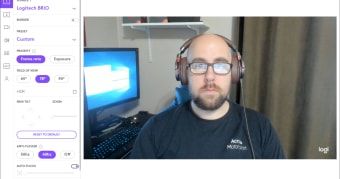
Logitech Capture is a free video software by Logitech. It is a video recording utility specifically developed to work with the company's high-end web camera product offerings. It aims to help content creators record and edit clips with the help of various tools and features.
Compared to the Logitech Webcam Software, Logitech Capture is focused more on video recording and boasts a more robust feature set that can be utilized for various applications and use cases. It lets users have more control over their clips with enhancement settings, filters, and other effects.
Focus on creating
Being a content creator has become a legitimate career path thanks to the help of video-sharing platforms, YouTube and more recently, TikTok. Whether it's an interactive stream, an informative piece, or a product showcase, you can start with just a camera and hit the record button. Speaking of cameras, if you happen to use one of Logitech's webcams, its Logitech Capture software is geared toward your needs.
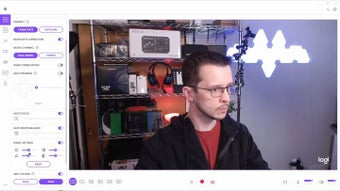
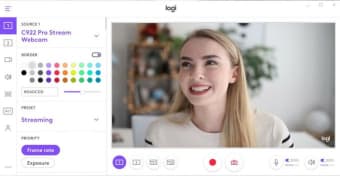
This software supports multiple sources and can help you record and edit your videos from a single utility. Link it up to your preferred video-sharing platform, and you can start broadcasting immediately. You can then adjust camera parameters like saturation, exposure, and contrast in real-time. You can even spruce up your videos with filters, borders, and other transition effects to achieve the look and style you want.
Streaming and recording made simple
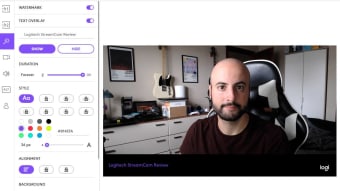
Logitech Capture continues to update its software to include enhanced features supported by Logitech’s product line. Some of the key additions are vertical video recording (9:16), which is increasingly useful for mobile and social content; more scene options so you can switch between camera + desktop, two webcams, or windows; live text overlays (name, messages) that can be styled; and support for saving multiple profiles (up to six), letting creators switch between setups quickly.
Other handy features include the option to add text overlays and recording in a vertical 9:16 aspect ratio for better viewing on mobile devices. Before proceeding, do note that this software only supports a handful of models. As of this writing, they are the Logitech Streamcam, C922 Pro Stream, C920S HD Pro, and the Brio 4K Pro. If you own any of them, you're good to go.
A handy tool for Logitech webcam users
Logitech Capture is a solid video recording utility tailored for Logitech’s higher-end webcams, offering creators more control with filters, effects, and scene management. Its support for vertical recording, multiple sources, and live overlays makes it versatile for both streaming and content creation. However, its usefulness is limited to a select group of models, meaning not all Logitech webcam owners can take advantage of its full potential.